
How to deploy a vibe-coded site for free
Last updated: 2026-11-11
Short answer: export the project from your vibe coding tool as a ZIP or push it to GitHub, then upload the finished build folder (usually dist or build) with “Upload a file” on the home screen and press Publish. You get an address like myname.html2site.com with no server. Apps that need a server or a database can't run here.
At a glance
- Time needed
- About 5 min
- Plan required
- Free plan
- Coding knowledge
- None
- Where to do it
- The upload cards on the home page
Step by step
- 1
Get the project out of the tool that made it
Vibe coding tools such as Lovable, Bolt, v0, Cursor, and Claude Code generally let you download the project as a ZIP or send it to a GitHub repository. Menu locations differ by tool, so look inside yours for words like export, download, or GitHub. You can also just ask the tool.
Lovable · Bolt · v0 · Cursor · Claude Code
Build this project as a static site and tell me which folder holds the finished files.build Copynpm run builddist/ index.html assets/ - 2
What you upload is the built folder
A downloaded project mixes source files with build output. You want the contents of the build output folder (usually dist or build), not the source. If index.html sits at the top with a folder like assets beside it, you've found the right one. Zip the files inside that folder. If your project was plain HTML from the start, skip this step. HTMLtoSITE doesn't run builds, so leave node_modules out.
my-site.zipindex.htmlassets/index.jsassets/index.cssfavicon.ico - 3
Have a ZIP? Use “Upload a file”
Pick your ZIP on the “Upload a file” card on the home screen and you'll land on the “Upload a ZIP” screen. Choose the ZIP once more in the “ZIP file” field there, then type a name in the “Your address” field. Press Publish and the upload and the publishing happen together.
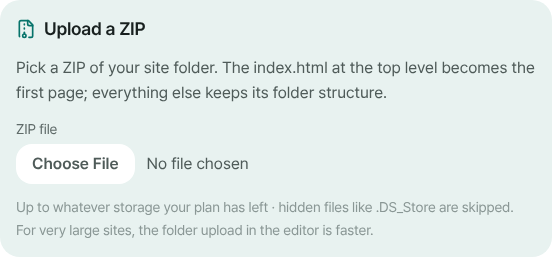
Choose the build ZIP in the “ZIP file” field, then pick your address. - 4
Code already on GitHub? Import the repo
If the repository is public and the built files sit at its top level, use the “Import from GitHub” card on the home screen and enter owner/repo in the “Repository” field. If the build output lives on another branch, put it in “Branch or tag (optional)”. Private repositories can't be imported. In a React or Vite source repository the top-level index.html is the pre-build file, so publishing it as is shows a blank page. In that case upload a ZIP instead.
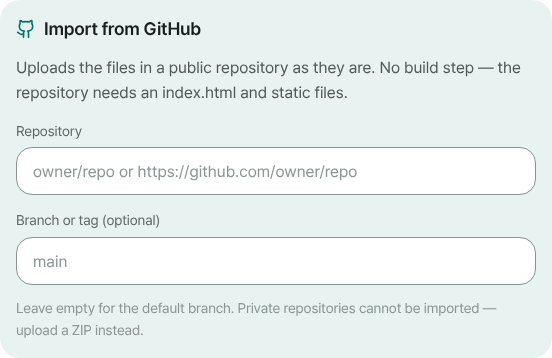
Enter the public repository and, if needed, a branch. - 5
Publish, then refresh a deep link to check
When publishing finishes, “Edit” opens the editor. If your files look like an app that handles addresses in the browser, “Open the main page for unknown addresses” is switched on for you. Confirm it under Settings ▸ Site settings ▸ Site ▸ More. Then open your address with one of the app's inner paths on the end and refresh. If the app appears instead of a 404, you're done.
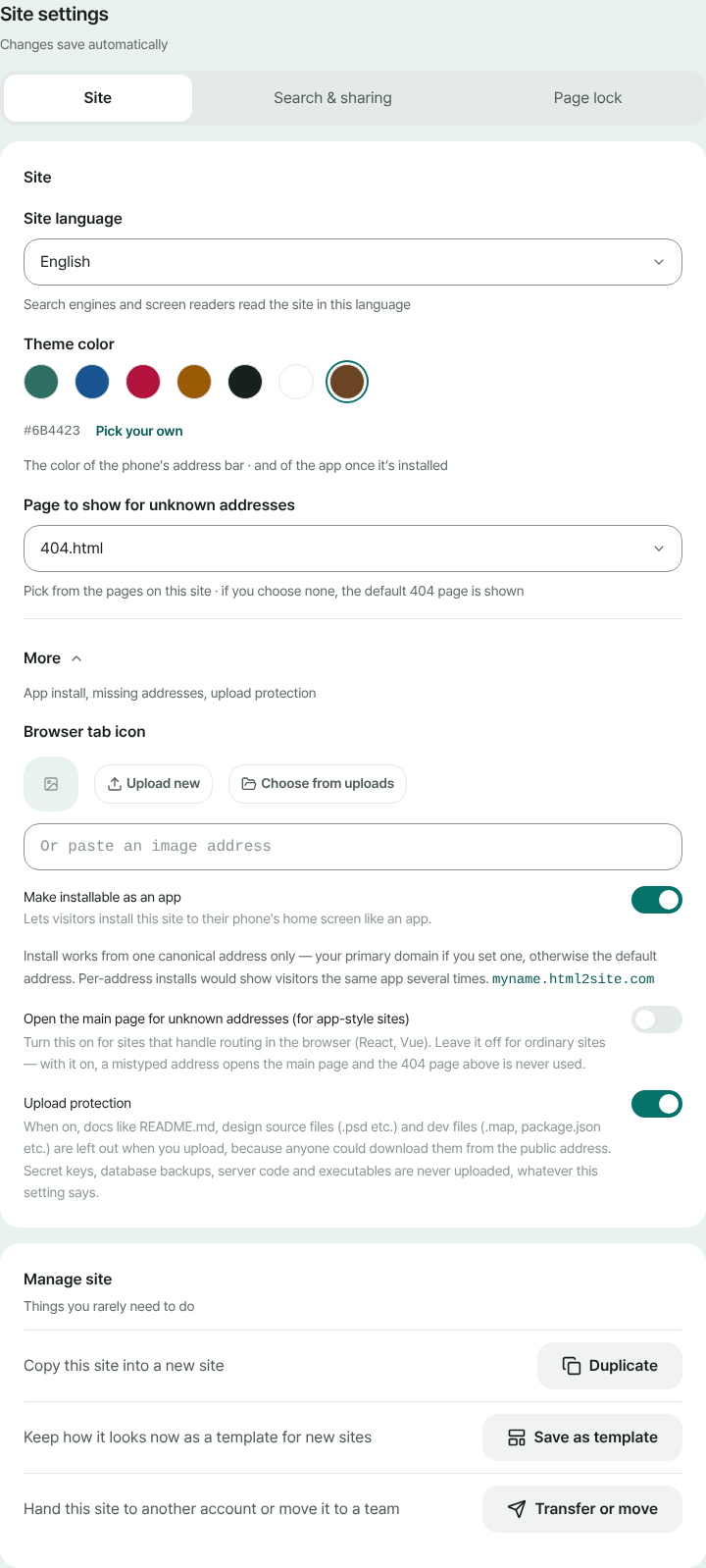
The toggle lives under Settings ▸ Site settings ▸ Site ▸ More.
Frequently asked questions
Can I deploy a vibe-coded site for free?
Yes, as long as the result is built into static files (HTML, CSS, JS). Free includes 5 sites and 100MB of storage, and a small “Made with HTMLtoSITE” badge sits in the corner of the site. Connecting your own domain starts at Plus.
Does this work for projects from Lovable, Bolt, v0, Cursor, and Claude Code?
What matters is the output, not the tool's name. If you can get the project out as a ZIP or through GitHub, and building it produces a static folder with an index.html, it can go up here. You don't need the tool's own share or publish feature.
Do I need a server, GitHub, or a hosting account?
No. Upload the build ZIP and choose an address. Signing up takes just an email, with no password or card. GitHub is only a convenient way in when your code already lives there.
My React or Vite site gives a 404 when I refresh. What do I do?
Turn on “Open the main page for unknown addresses”. These apps don't have a file per address. A script draws each screen, so with the setting off, a direct link or a refresh gives a 404. It switches on by itself when the upload looks like an app, and you can flip it under Settings ▸ Site settings ▸ Site ▸ More.
Can I publish an app with logins, a database, or API keys?
Only the front end goes up. Anything that needs a server to run won't work, and server code (.php, .py and so on) is blocked for safety. Files sent to a browser can be read by anyone through view-source, so never ship a secret key inside your code.
How do I update the site after changing it in the tool?
Rebuild, zip the result, and upload the ZIP from the + button on the editor's Files tab. Files at the same path are overwritten and files missing from the ZIP stay put. Press Publish and the same address updates. Every publish leaves a version, and you can go back with Restore on the Versions tab.
Read next
- Upload a site folder as a ZIP and get your own address Guide to publishing a multi-file site (CSS, JS, images, extra pages) from a ZIP or a whole folder to your own address for free (English)
- Import a GitHub repository and deploy it as a static site Guide to importing a public GitHub repository's static files and publishing them free at your own address: no build step, index.html required (English)
- SPA gives a 404 on refresh? One setting fixes it How to fix 404 on refresh for React and Vue single-page apps on static hosting, using the SPA setting and how it interacts with the 404 page (English)
- How to publish an HTML site without Git or GitHub How to publish an HTML or ZIP site to a free address without Git, GitHub or a terminal (a GitHub Pages alternative): paste or upload, pick an address, then update and roll back without Git (English)
Trying it is faster than reading about it — paste your HTML and publish it in a minute.