
SPA gives a 404 on refresh? One setting fixes it
Last updated: 2026-11-11
Short answer: in Site settings > Site, open More and turn on “Open the main page for unknown addresses (for app-style sites)”; direct links and refreshes on a React or Vue site then open your app instead of a 404. Note that with it on, the “Page to show for unknown addresses” is not used for ordinary addresses, so pick the one that fits your site.
At a glance
- Time needed
- About 2 min
- Plan required
- Free plan
- Coding knowledge
- None
- Where to do it
- Editor
Step by step
- 1
Upload your build output folder
For a React, Vue or Vite site, upload the folder your build command produces (usually dist), either zipped or as a folder. These sites ship an almost empty index.html and a script draws the screen. So there is no file for an address like /about, and with the setting off, opening that address directly or refreshing it gives a 404.
index.html<!doctype html><div id="root"></div><script type="module" src="/assets/index.js"></script> - 2
Check that the SPA setting is on
Right after a ZIP, folder or GitHub import, if your files clearly look like this kind of app, the setting is turned on for you and the editor tells you. To check it yourself, go to Settings > Site settings > Site in the left rail, open More, and switch on “Open the main page for unknown addresses (for app-style sites)”. Changes save automatically and apply right away, with no need to publish again.
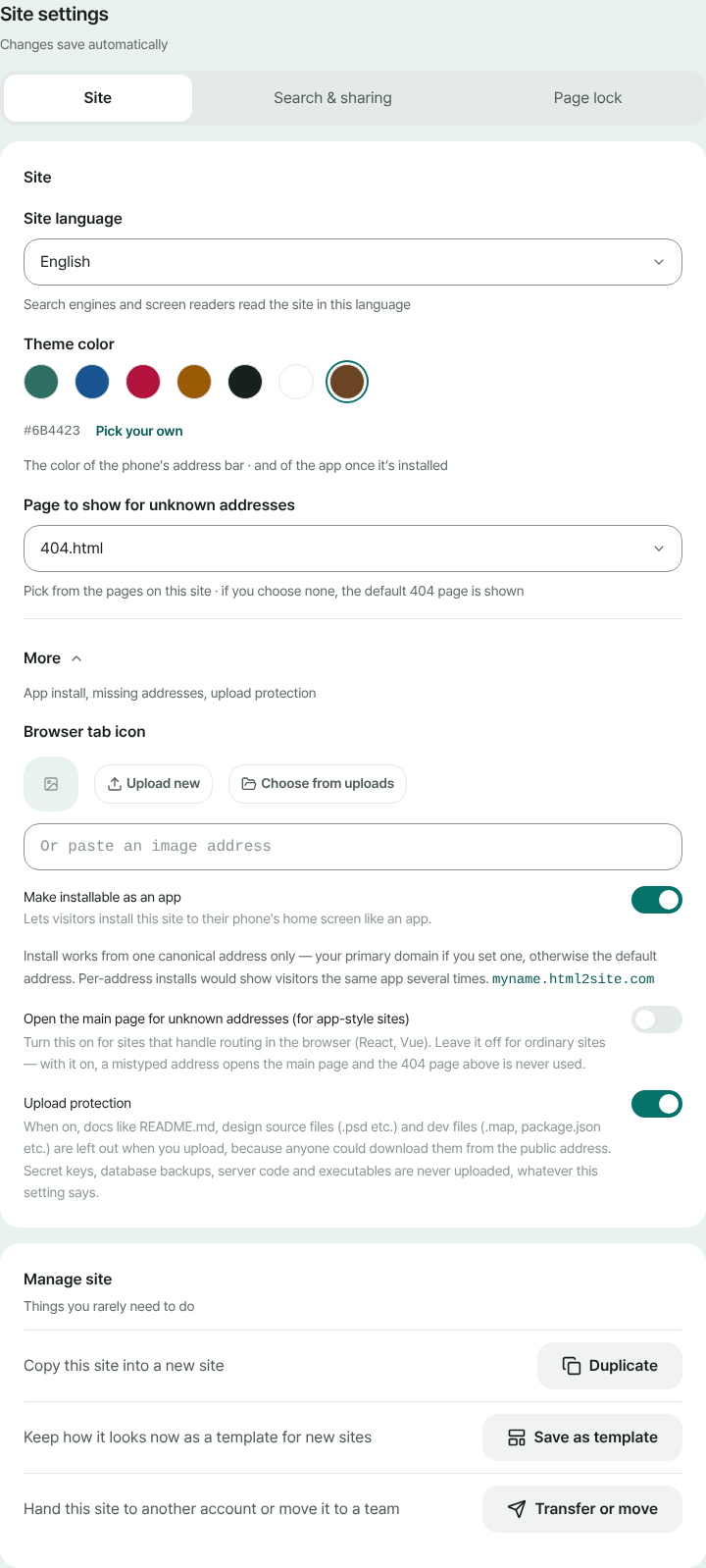
Site settings > Site > More holds the SPA toggle - 3
Test with a direct link and a refresh
Open your address with one of your app's routes on the end, then refresh. If your app shows up instead of a 404, you're done. Only screen-style addresses (no file extension) open the main page; a missing file with an extension, like an image or script, still returns a 404.
myname.html2site.com/about LiveWith the toggle on, refreshing this address opens your app
- 4
Using it with a 404 page? Pick one
“Page to show for unknown addresses” is chosen in Site settings > Site from the pages on this site (leave it empty for the default 404 page). That is the right choice for ordinary multi-page sites, with the SPA toggle left off. With the toggle on, unknown addresses open the main page, so that 404 page is not used. If you want a “not found” screen inside an app, build it in your app's router.
Site settings > SitePage to show for unknown addresses Default 404 pageOpen the main page for unknown addresses ON
Frequently asked questions
Why does my React app show a 404 when I refresh?
A single-page app does not have a file per address; a script in the browser reads the address and draws the screen. Static hosting looks for a file with the same name as the address, finds none for /about, and returns a 404. Turning on the SPA setting makes that address serve your main page instead, so your app takes over.
Do I have to turn the SPA setting on myself?
Right after a ZIP, folder or GitHub import it turns on automatically when your files clearly look like an app (for example an empty main page that a script fills in). When the signs are weaker, Site settings shows a suggestion with the reason under More. Either way you can switch it on or off with the toggle.
Can I leave it on for an ordinary website?
Not recommended. With it on, every mistyped address opens the main page, so your custom 404 page is never used, and search engines may treat unknown addresses as real pages. Sites that have a file per page should keep it off.
Can I still show a “page not found” screen on an SPA site?
This setting sends unknown addresses to the main page, so that screen has to come from your app's own router. If you would rather use a 404 page, turn the toggle off and choose a page under “Page to show for unknown addresses”.
I turned it on and still get a 404. Why?
First check that the file list has a main page (index.html); without it there is nothing to open, so you get a 404. Also, addresses with a file extension such as .js or .png correctly return a 404 when the file is missing, so check that the paths your app loads are right.
Read next
- Upload a site folder as a ZIP and get your own address Guide to publishing a multi-file site (CSS, JS, images, extra pages) from a ZIP or a whole folder to your own address for free (English)
- Import a GitHub repository and deploy it as a static site Guide to importing a public GitHub repository's static files and publishing them free at your own address: no build step, index.html required (English)
- Undo a publish: roll your site back to an earlier version How to roll back a published website to an earlier version: review, restore, undo the restore, and what free and Plus keep (English)
- How to connect your own domain to your site Step-by-step guide to connect your own domain to a published HTML site: enter the address, add the CNAME and TXT values at your domain provider, wait for Connected, HTTPS automatic (from Plus)
Trying it is faster than reading about it — paste your HTML and publish it in a minute.