
Check your usage — sites, storage, domains, and AI, all in one place
Last updated: 2026-08-10
Short version — /usage shows how much of your plan's limits you have left for sites, storage, custom domains, and AI usage, broken down by all/personal/team. AI has a monthly limit you can extend with one-time top-up packs, and AI used on a team site still draws from that site's owner account, not a per-member limit.
At a glance
- Time needed
- About 2 min
- Plan required
- Free plan
- Coding knowledge
- None
- Where to do it
- Account
Step by step
- 1
Start with the at-a-glance view on /usage
Once you're signed in, /usage lays out sites, storage, custom domains, and AI usage on one screen. Each one shows a bar for what you've used against your plan's limit, so you can see at a glance which one you're closest to hitting.
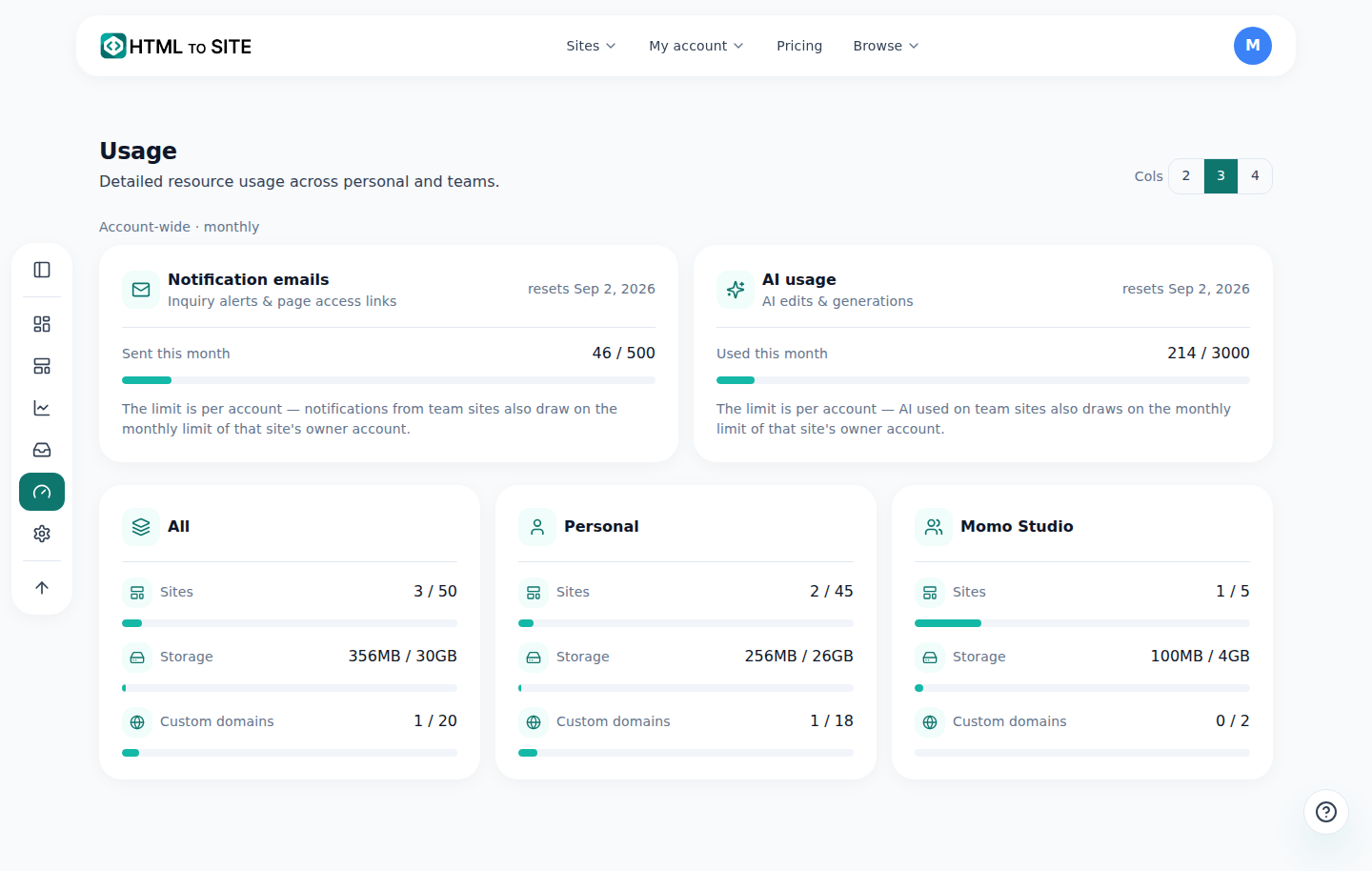
The bars show at a glance how close you are to each limit. - 2
Break it down by all, personal, or team
Sites, storage, and domains show up as separate cards, so you can check the combined “All” total, your own “Personal” share, and each team you're part of, individually. If Momo Coffee is a team-owned site, its storage and domain count show up under that team's card, kept apart from your personal numbers.
Usage › ScopeAll 4 sites · 1.4GB/8GB · 1/5 domainsPersonal 2 sites · 600MB/3GB · 0/2 domainsMomo Coffee team 2 sites · 800MB/5GB · 1/3 domains - 3
AI usage has a monthly limit — top-up packs cover the rest
The AI usage card shows what you've used this month, your limit, and when it resets next. Running out doesn't stop you cold — buy a one-time top-up pack and keep going. Units from a pack don't expire as long as your subscription stays active, so any leftover carries over past the monthly reset too.
Usage › AI usageUsed this month 180 / 200Top-up credits left +250Resets Sep 1 - 4
AI on a team site still draws from the owner account's limit
The limit is set per account, not per team member — there's no separate quota for each person on a team. If Momo Coffee is team-owned, any AI edit run on it — no matter who on the team triggers it — comes out of that site's owner account's monthly limit (usually whoever created the team). That's why AI usage isn't split out per team card — it only shows up once, in the account-wide section.
Usage › AI usageSite Momo Coffee (team-owned)Drawn from Owner account's monthly limitNote The limit is per account — AI used on team sites also draws on the monthly limit of that site's owner account.
Frequently asked questions
If I use AI editing on a team site, whose limit does it come out of?
It comes out of the monthly limit of the account that owns the site. There's no separate limit for each team member.
When do AI top-up packs expire?
They don't, as long as your subscription stays active.
Where do I check my usage?
At /usage.
Does storage show up there too?
Yes — right alongside your site and domain counts.
Can I see usage for multiple teams separately?
Yes — you can break it down by all, personal, or each team.
Read next
- Check your billing history and request a refund How to check payment history on /billing and request a refund on YavePay within 24 hours of an unused payment (English)
- Changing your plan or canceling — what happens, and when How to upgrade, downgrade, and cancel a subscription from the Plan page — upgrades are immediate, downgrades and cancellations wait for the next billing date (English)
- The editor's AI edit assistant: describe it, and it edits the code How the editor's AI edit assistant works — describe changes in plain language, click to point, publish to go live, and how revert really works (English)
- How to check who's visiting your site How to read visitor analytics in the editor's Analytics tab — what each plan tier shows (English)
Trying it is faster than reading about it — paste your HTML now.