
Get your site found — by search engines and AI answers alike
Last updated: 2026-08-10
Short version — fill in title and description in the editor's Branding tab and set search visibility to public, and sitemap.xml and robots.txt are generated the moment you save. Add an answer-first sentence and question-style FAQ on top of that, and you're set up to get cited by ChatGPT, Perplexity, and similar AI answers too.
At a glance
- Time needed
- About 5 min
- Plan required
- Free plan
- Coding knowledge
- None
- Where to do it
- Editor
Step by step
- 1
Fill in search & sharing info in the Branding tab
Open “Branding” in the editor's side menu — there are three sections: basics, social sharing, and search engine. Title and description here are site-wide defaults: if your pasted HTML page already has its own title or description, that wins, and these fields only fill the gap. Save, and robots.txt and sitemap.xml are generated automatically too — as long as you haven't uploaded your own versions of those files. Set “Search engine” to public to open up search traffic. Noindex only excludes the page from search results, it doesn't hide it — anyone with the address can still open it. For actual privacy, use the page-lock feature instead.
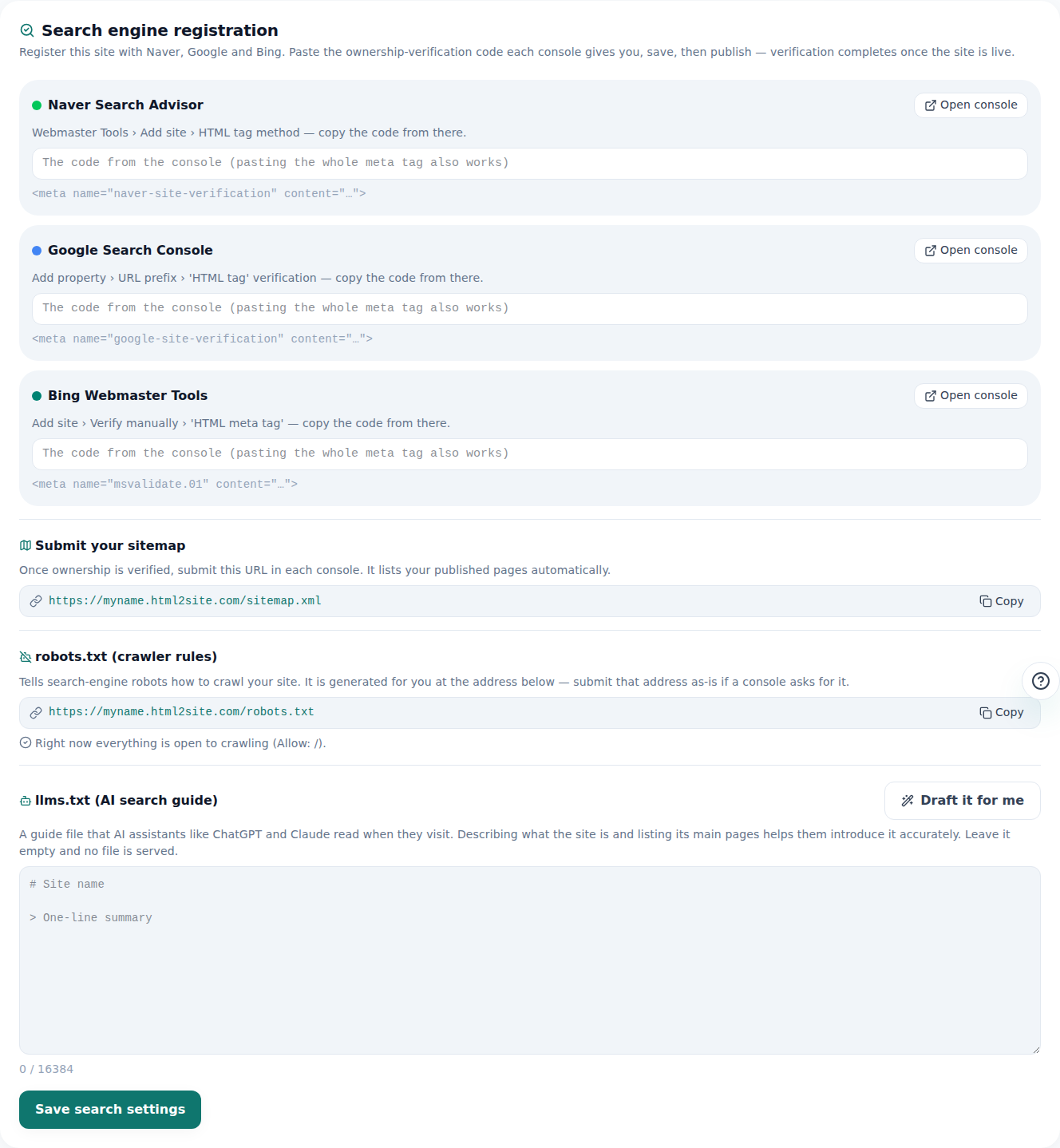
Paste the verification code, save, publish — that's the registration done. - 2
Lead with the answer, and phrase FAQs as questions
AI answers and search snippets don't summarize your whole page — they lift the one or two clearest sentences as-is. Put a “Short version — doing X gets you Y” sentence at the very top, and write FAQ headings as actual questions (“Is it...?”) instead of topic labels. Match the exact wording someone would type into a search box or ask an AI.
What time does Momo Coffee open?Momo Coffee Weekdays 8am–8pm, weekends 10am–6pm · myname.html2site.com - 3
Add structured data (JSON-LD) for more accurate citations
Structured data is a label that tells AI and search engines exactly what a page is and what its facts are, without guessing. You don't need to know code — ask the AI in the editor and it adds it to your page head. Want to paste your own script instead? Head injection is available from the Advanced plan.
Edit assistantAdd FAQ structured data Added FAQPage structured data to the head. - 4
See what it actually looks like
Rather than just describe it, here's the real thing: this is HTMLtoSITE's own llms.txt — the one-page briefing AI engines read to learn what a site is about. Once you've filled in your Branding settings, you can check the same idea at your own address's /robots.txt and /sitemap.xml.
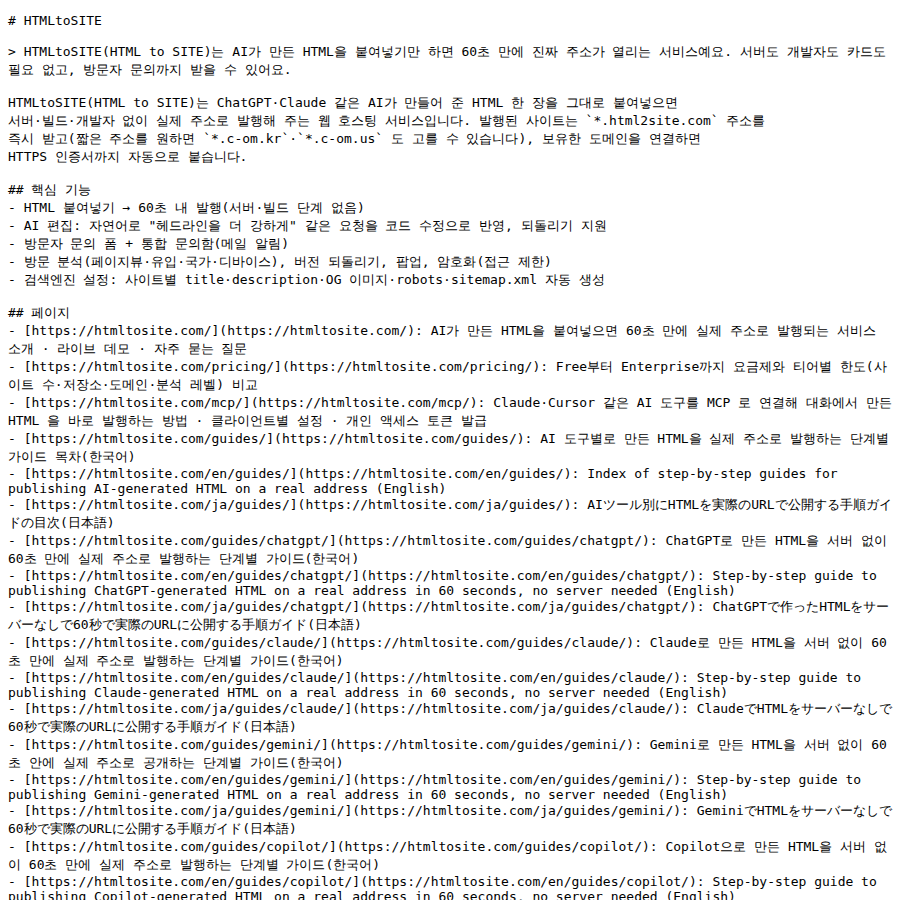
A real example — this is what an AEO-friendly one-pager looks like.
Frequently asked questions
Does the free plan get indexed by search engines too?
Yes. Fill in title and description in the Branding tab and set “Search engine” to public, and the free plan is indexed exactly the same way. sitemap.xml is on by default, so there's nothing extra to configure.
Do ChatGPT and Perplexity actually crawl my site?
Yes, unless you block them. The auto-generated robots.txt allows every crawler by default, so AI crawlers get the same access as everyone else. Switching to noindex turns that auto-generated file into a full block — but if you've uploaded your own robots.txt, that file takes priority and noindex won't change its rules; you'd need to edit that file yourself.
Is AEO/GEO different from SEO?
Same foundation — clear titles, descriptions, and structured data serve both search and AI answers. AEO (Answer Engine Optimization) and GEO (Generative Engine Optimization) are just names for putting extra weight on answer-first writing and question-style FAQs — there's no separate setup to maintain.
Do I have to add structured data?
It's not required, but it helps. You can ask the AI in the editor to add it without touching code, or paste your own script through head injection from the Advanced plan.
Does search traffic show up right after I save?
No. robots.txt and sitemap.xml update immediately, but it usually takes search engines days to weeks to actually crawl and index the changes.
Read next
- How to check who's visiting your site How to read visitor analytics in the editor's Analytics tab — what each plan tier shows (English)
- Connect your own domain — two DNS records, then it's automatic How to connect a domain you own to a published site and get HTTPS issued automatically (English)
- One form for visitor inquiries, one inbox for every site How to build a visitor inquiry form and check every site's inquiries from one unified inbox (English)
- Managing your sites — folders, rename, delete & recovery How to organize sites into folders, rename them, and undo a deletion within 7 days from the /sites dashboard (English)
Trying it is faster than reading about it — paste your HTML now.