
Show your own page on URLs that don't exist
Last updated: 2026-08-10
Short version — pick an already-published page as your custom 404 path in the editor's Branding tab, under Search engine. Visitors who land on a bad URL get that page with a real 404 status, and the address bar never redirects.
At a glance
- Time needed
- About 3 min
- Plan required
- Starter
- Coding knowledge
- None
- Where to do it
- Editor
Step by step
- 1
Pick a page to serve as your 404 in the Branding tab
Open “More” in the editor's side menu, go to Branding, and look in the Search engine section for “Custom 404 path.” Pick from your already-published HTML files or type a path directly. Say Momo Coffee keeps a not-found.html with a friendly message and a button back to the homepage — that's the path you'd set here.
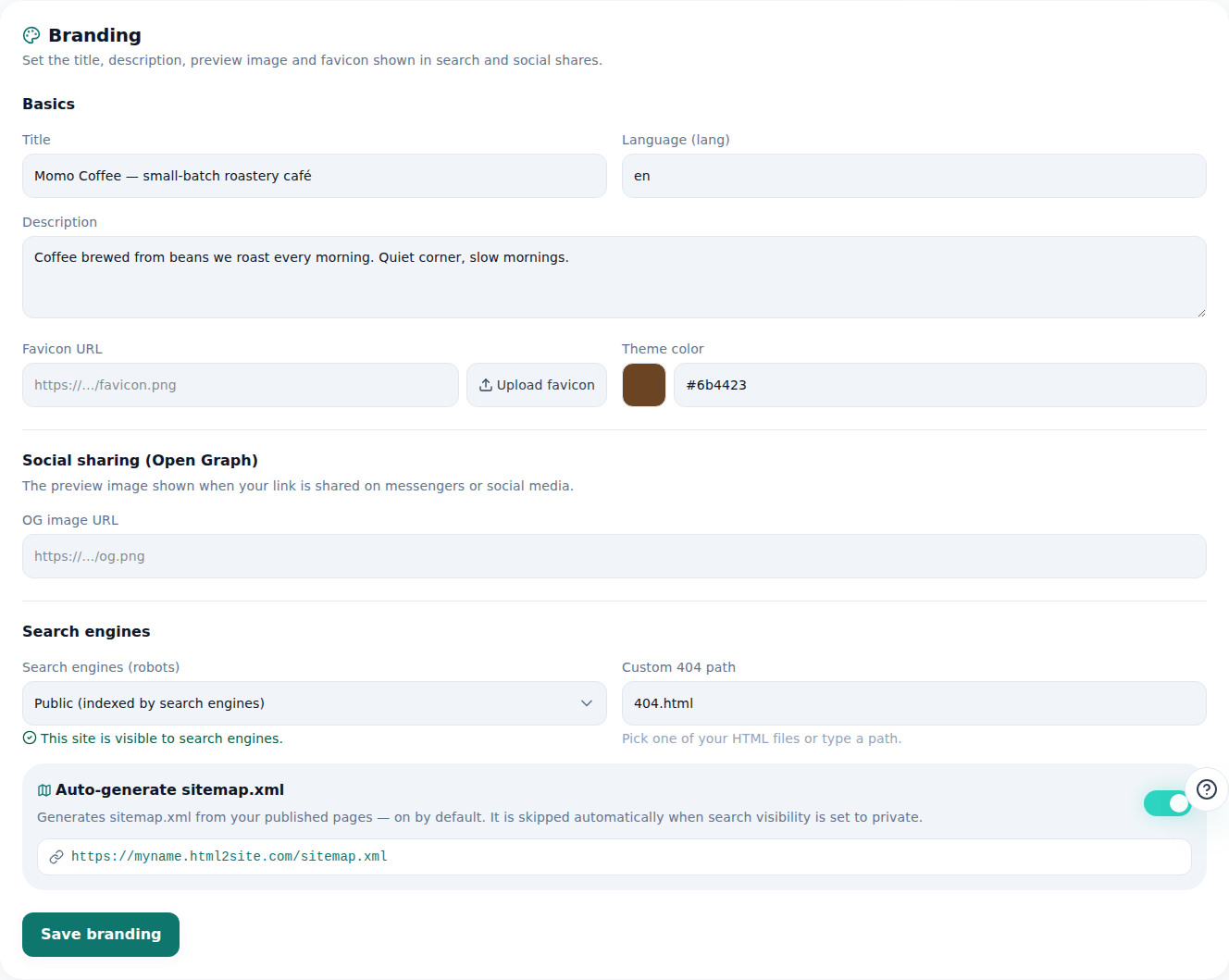
Pick the 404.html you made here and missing addresses will show it. - 2
A bad URL serves that page with a real 404 — no redirect
When a visitor lands on something like myname.html2site.com/menu-old, the address bar stays exactly as they typed it — nothing redirects. Only the content on screen changes to your chosen page, and the response status is a genuine HTTP 404. Search engines read it as “not found,” not as a normal page.
myname.html2site.com/menu-old LiveThe URL stays put — only the screen changes to your custom 404 page (status 404).
- 3
If that page is locked, the lock still applies
If the page you set as your custom 404 has a page lock (password) on it, visitors arriving through a bad URL see the lock screen first, same as anyone else. The 404 path is not a backdoor around the lock — content is never sent to a visitor who hasn't unlocked it.
Branding › Search engineCustom 404 path secret-menu.htmlPage lock on secret-menu.html On — still enforced via bad URLs - 4
Free on every plan
There's no plan restriction on the custom 404 path setting. A Momo Coffee site running on the free plan can set it from the Branding tab right away.
Branding › Search engineCustom 404 path not-found.htmlPlan required Every plan, including Free
Frequently asked questions
Can I design my own 404 page?
Yes — just point the setting at any page you've already published.
Does a bad URL redirect to another address?
No, the address stays as typed. Only the screen content changes, served with a real 404 status.
Does the free plan support a custom 404 page?
Yes, it works on every plan.
If I set a locked page as my 404, does that unlock it?
No, the page's lock still applies even when reached through a bad URL.
Can I set more than one 404 page per site?
No, it's one per site.
Read next
- Adding multiple pages to your site How to add multiple HTML pages (files) to a site, and what's different between the free and Starter plans (English)
- Managing your sites — folders, rename, delete & recovery How to organize sites into folders, rename them, and undo a deletion within 7 days from the /sites dashboard (English)
- Get your site found — by search engines and AI answers alike How to get a published site found by search engines and AI answers (AEO) — from Branding settings to structured data (English)
- Restrict access to one page (page lock) How to restrict access to a specific page with the editor's encryption tab — it's an access gate at serve time, not file encryption, available from Starter (English)
Trying it is faster than reading about it — paste your HTML now.